
Office Chair Mechanisms: How to Choose One and How to Use It
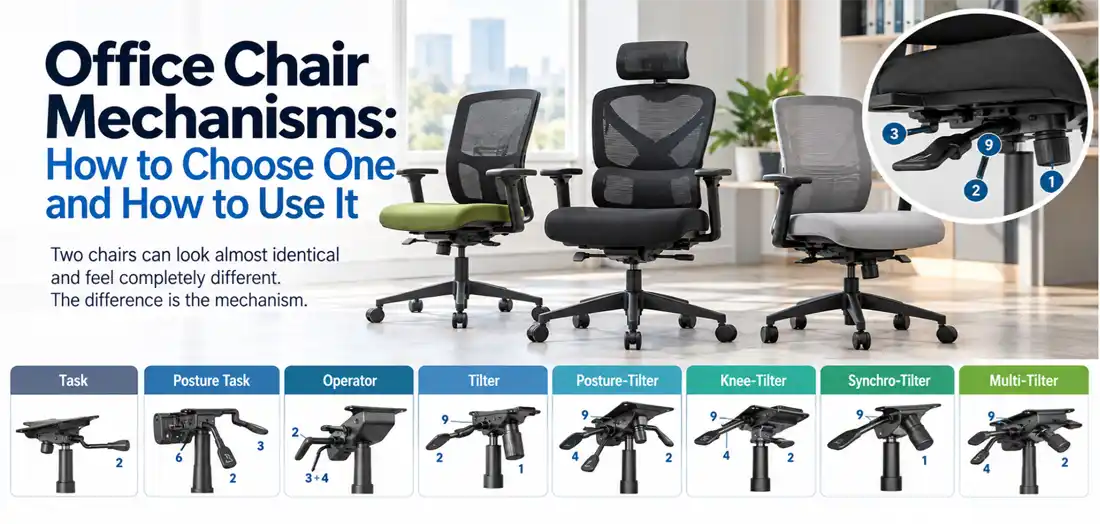
Two office chairs can look almost identical and feel completely different. The reason is usually the mechanism, the part under the seat that decides how the chair moves, reclines, and holds you. Most chair pages never explain it. This guide does. First we show you how to pick the right mechanism for the way you work, then we show you how to actually use it once it is under your desk.
Everything here applies to Global and Offices to Go chairs, which share the same mechanism family.
First, the controls you will find
Before looking at the mechanisms themselves, it helps to understand the standard controls used across the range. Global uses the same numbered levers across chairs, making setup consistent once you recognise them.
- Seat height (pneumatic) [Lever 2]
- Located under the right side of the seat. Set this control so your feet rest flat on the floor, your thighs remain level, and your knees sit at roughly a 90-degree angle.
- Seat depth / sliding seat pan [Lever 8]
- Pull or release this lever to slide the seat pan forward or back. Maintain two or three fingers of clearance between the front waterfall edge and the back of your knees.
- Back angle [Lever 3]
- Changes the angle of the backrest independently of the seat pan.
- Seat angle [Lever 4]
- Tips the angle of the seat pan forward or rearward, useful for detailed or bench work.
- Back or lumbar height [Knob 6 or Ratchet Back]
- Moves the backrest cushion up or down to align the lumbar curve with the small of your back.
- Tilt tension [Control 1]
- A round knob or side dial under the mechanism. Turn it clockwise or counterclockwise to match the resistance to your body weight.
- Tilt lock [Lever 9]
- Locks the recline angle in place. Depending on the model, this locks either in standard preset angles or at any continuous point along the travel path.
- Swivel and casters
- Standard on all functional task bases to allow full 360-degree rotation and smooth mobility without twisting your spine.
How to choose the right mechanism
You do not need to memorise all eleven. Match the mechanism to how the chair will be used.
- Occasional or light desk use, or a tight budget
- A Task or a Tilter does the job.
- Full time at a desk, and the chair is shared by more than one person
- A Synchro-Tilter, or a weight-sensing version of it, is the easiest answer. The back reclines further than the seat so your feet stay planted, and weight-sensing models adjust tension automatically.
- Full time at a desk, dedicated to one user who prefers fine-tuned adjustments
- A Multi-Tilter provides the highest level of independent control.
- Reception, boardroom or meeting rooms, where people sit for shorter durations
- A Tilter or an Operator keeps costs down while preserving comfort during a standard meeting.
- Close, forward-leaning tasks such as drafting, laboratory stations, or technical inspection
- A Posture-Tilter or a Knee-Tilter allows the seat to angle forward to maintain pelvic support.
Task and Operator Chairs
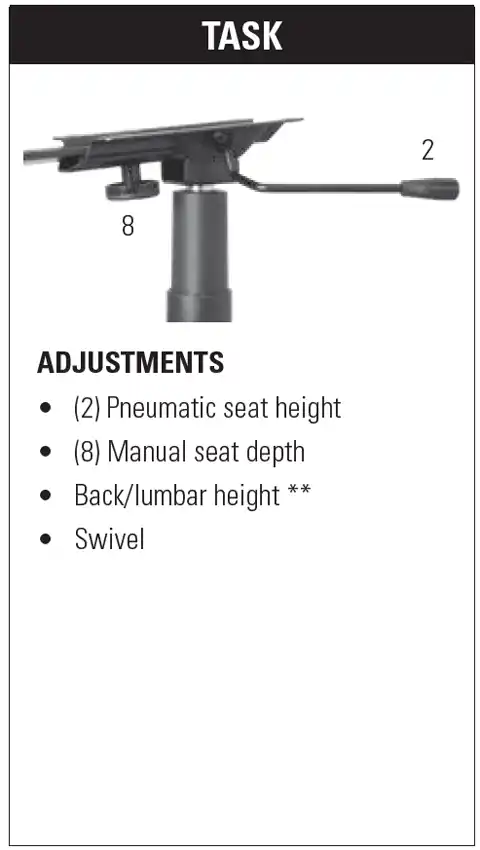
Task
What it is
The simplest mechanism in the lineup, engineered for value, simplicity, and clean function.
Best for
Light to moderate desk duty, home offices, and workspaces where users prefer not to manage multiple levers.
How to use it
Lift lever (2) to set seat height. Loosen hand wheel (8) under the pan to manually adjust seat depth, then tighten it back down. Slide the backrest up or down to align with your lumbar spine.
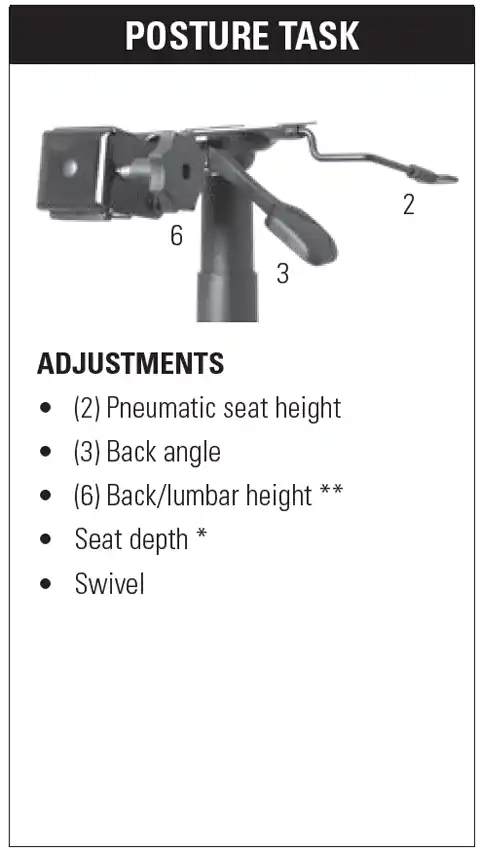
Posture Task
What it is
An upgraded task chassis providing independent back angle positioning without a rocking recline.
Best for
Users who want to fix their backrest at a specific upright angle for task work.
How to use it
Adjust seat height with lever (2). Lift lever (3) to recline or bring the backrest forward, then release the paddle to lock it. Turn knob (6) to set the height of the backrest cushion against your lower back.
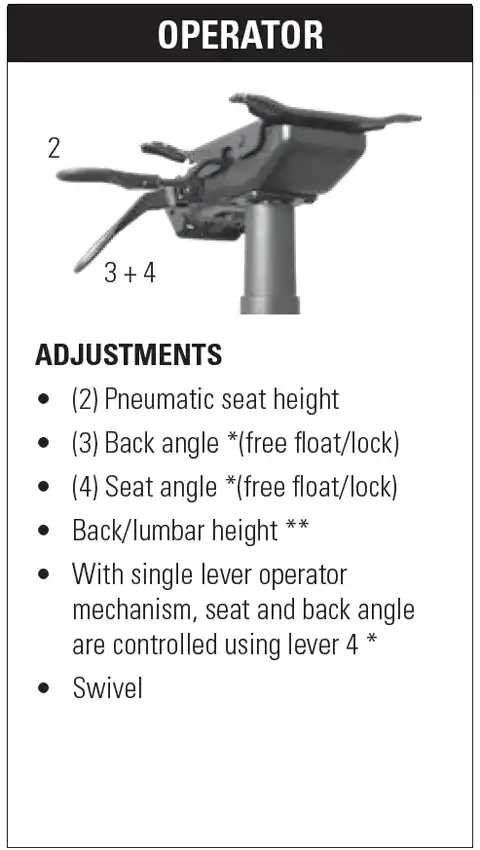
Operator
What it is
A durable workhorse mechanism where the seat and back angle operate in tandem.
Best for
General operational offices, administrative stations, and customer service desks.
How to use it
Regulate height using lever (2). Use lever (3) for back angle and lever (4) for seat pitch, or use single lever (4) on combination models to release both seat and back into free-float mode, locking them once your desired posture is reached.
Tilters
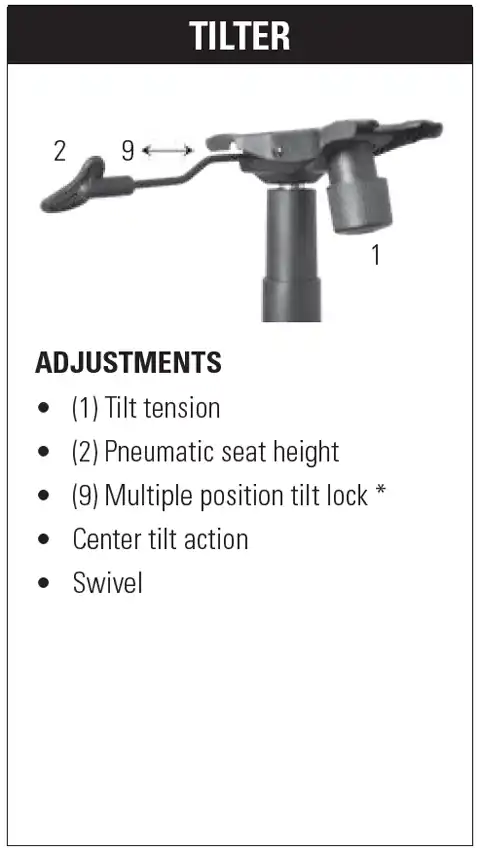
Tilter
What it is
The standard executive recline mechanism where the seat pan and backrest tilt backwards as a single unit around a central pivot point.
Best for
Conference rooms, boardroom tables, executive offices, and users who enjoy periodic rocking.
How to use it
Set your seat height using lever (2). Turn cylinder knob (1) underneath to calibrate tilt resistance to your weight. Push lever (9) inward to lock the chair upright, or pull it outward to allow a smooth, unrestricted rocking motion.
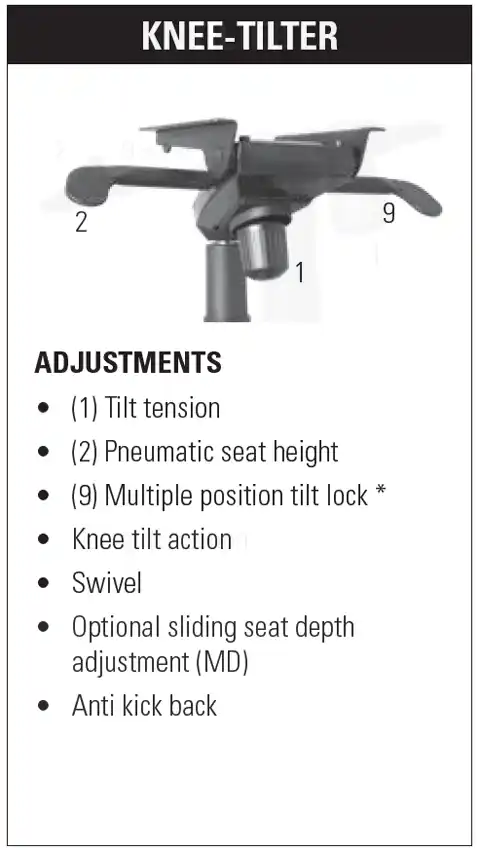
Knee-Tilter
What it is
A specialized tilter mechanism where the pivot point is positioned close to the front of the seat pan near the knees, rather than dead-centre under the seat.
Best for
Executive and computer workspaces where you recline often while typing and wish to prevent your feet from lifting off the carpet.
How to use it
Calibrate pneumatic height using lever (2). Rotate tension knob (1) until reclining feels balanced and fluid. Set the multi-position lock (9) to freeze the angle, or keep it open. Because the front pivot does not rise as you tilt back, leg circulation remains unobstructed.
Synchro Mechanisms
Synchro mechanisms move the backrest approximately two degrees for every one degree of seat recline (a 2-to-1 ratio). This biomechanical geometry prevents the front seat edge from lifting against your thighs and keeps your eyes aligned with your monitors.
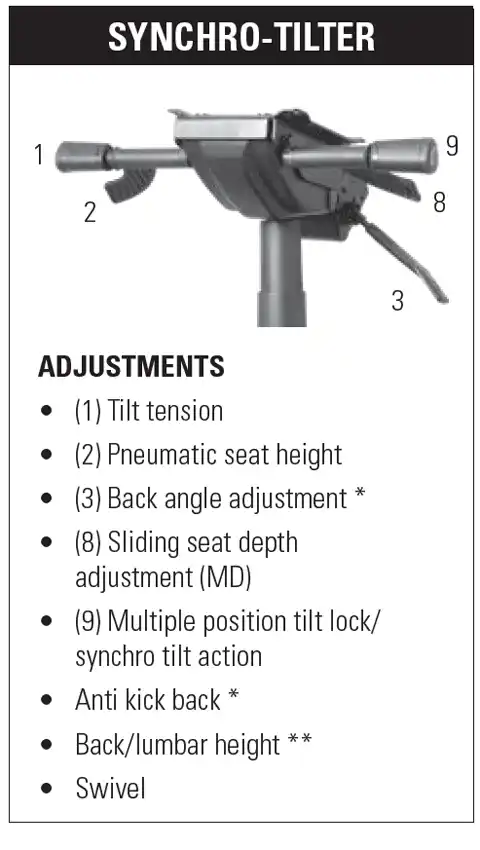
Synchro-Tilter
What it is
The premier mechanism choice for full eight-hour workdays, providing synchronized ergonomic support as you shift between postures.
Best for
Dedicated administrative, computer, and shared professional workstations.
How to use it
Set seat height with paddle (2). Slide seat depth using lever (8) to support your upper legs without placing pressure behind the knees. Turn tension cylinder (1) to calibrate back resistance. Turn lever (9) to lock your preferred tilt angle or leave it unlocked; built-in anti-kickback technology ensures the backrest will not snap forward when unlocked.
Weight-Sensing Synchro-Tilter
What it is
An intuitive variant of the synchro platform that uses your body weight on the seat pan to mechanically set recline resistance automatically.
Best for
Hot-desking, shared meeting spaces, agile team tables, and workstations where different individuals use the same chair throughout the week.
How to use it
Simply sit down and raise or lower lever (2) to set your floor height. Slide lever (8) to dial in your seat depth. The chair automatically adjusts recline resistance based on your weight, removing the need for manual tension adjustments.
Video: How to Adjust Your Weight-Sensing Synchro-Tilter Chair Mechanism
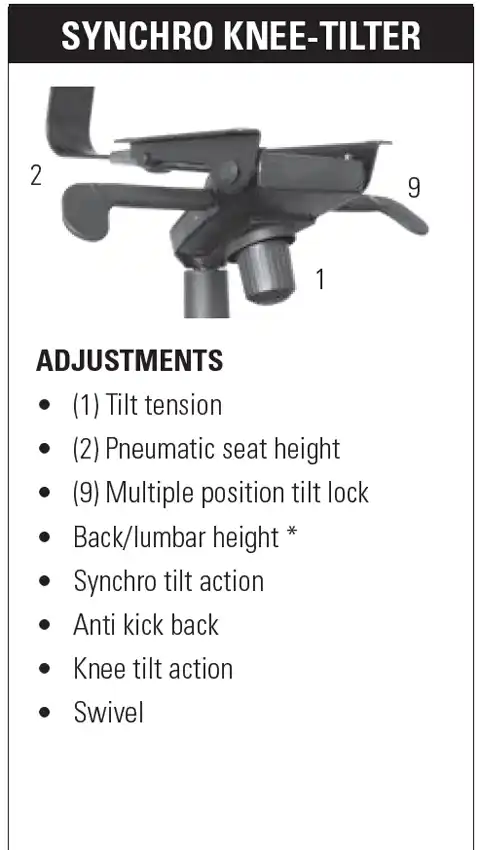
Synchro Knee-Tilter
What it is
A combination of the 2-to-1 synchro motion and a front-positioned knee pivot.
Best for
High-intensity desk work where users frequently shift from deep reclined phone calls to upright typing without altering their foot posture.
How to use it
Adjust height via lever (2). Turn front dial (1) to balance tension. Engage lever (9) to limit recline travel or hold a specific angle. Enjoy synchronized recline geometry without feeling upward lift under your thighs.
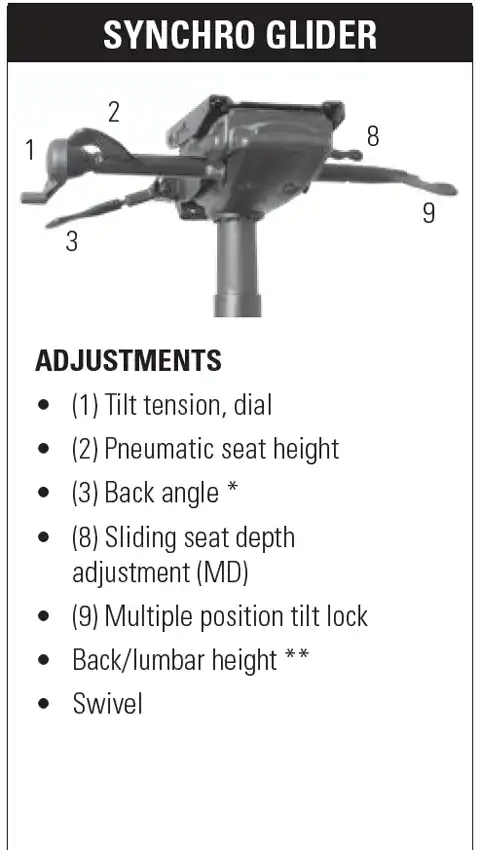
Synchro Glider
What it is
A specialized synchro mechanism featuring a horizontal gliding seat movement and an ergonomic side tension crank.
Best for
Users who want a fluid, non-jarring recline with an easily accessible side adjustment.
How to use it
Turn side dial (1) clockwise to firm up the recline resistance without reaching awkwardly underneath the seat pan. Lift lever (2) to set height and lever (8) to glide the seat pan forward or back. Use lever (9) to select your multi-position stop point.
Advanced Multi-Function Mechanisms
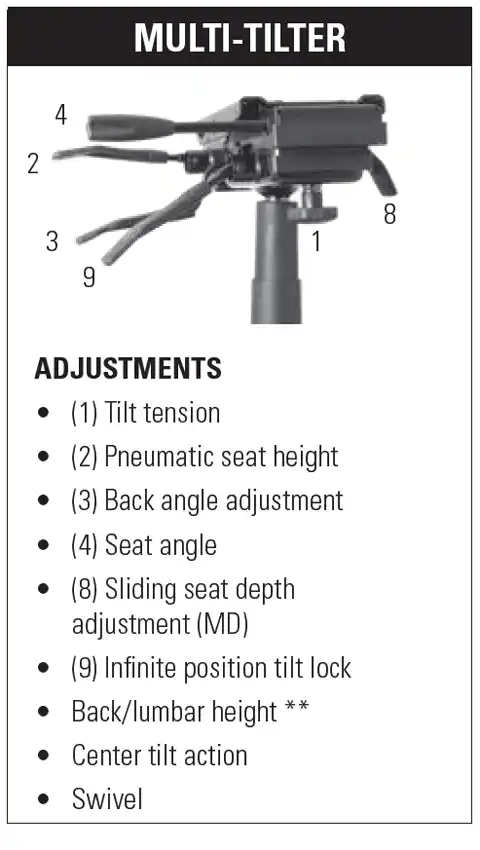
Multi-Tilter
What it is
The most comprehensive and fully customizable mechanism available, featuring fully independent levers for back pitch, seat angle, sliding seat pan, and center recline.
Best for
Dedicated daily task users who demand precision support, individuals with chronic back issues, and flagship chairs like the ObusForme Comfort series.
How to use it
- Set seat height using lever (2).
- Slide seat depth forward or back using lever (8).
- Set your backrest angle by lifting lever (3) and locking it.
- Set seat pan rake with lever (4), tilting the nose slightly down for typing or back for lounging.
- Calibrate tilt tension knob (1) and use infinite lock lever (9) to hold any recline position.
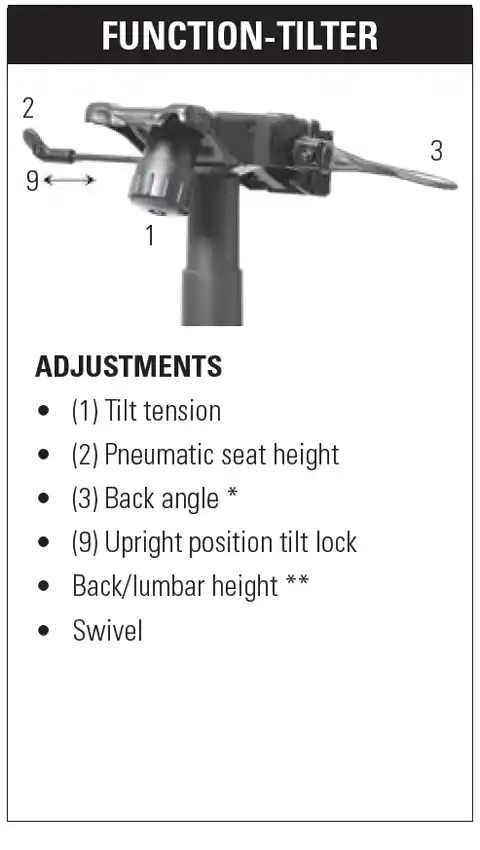
Function-Tilter
What it is
A versatile tilter mechanism providing both free-floating recline action and an independent upright lock paired with dedicated back angle control.
Best for
Users who transition between rigorous upright computing and relaxed reclined reading or phone work.
How to use it
Adjust height with lever (2). Set back angle to your preferred lumbar posture with lever (3). Engage the upright lock when preparing for intensive work to keep the chassis secure, or release it when you wish to tilt back.
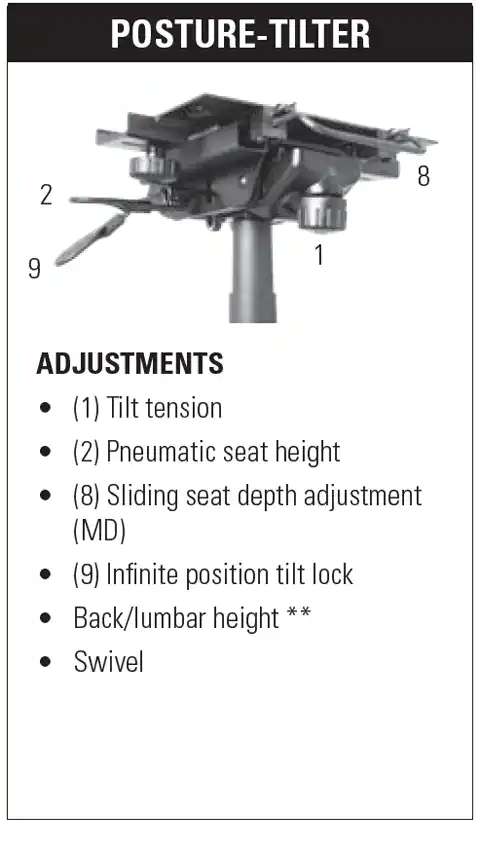
Posture-Tilter
What it is
An ergonomic tilt chassis specifically engineered to encourage forward pelvic rotation and upright postural alignment.
Best for
Clinical settings, laboratory stations, data entry desks, and individuals who naturally work while leaning slightly forward.
How to use it
Adjust seat height with lever (2). Extend seat depth via paddle (8). Adjust tension knob (1) and secure your posture using infinite position lock (9) to support your pelvis.
How to set up any office chair, in the right order
Whatever mechanism you choose, follow this step-by-step sequence to get your setup right the first time:
- Pneumatic Height: Raise or lower your seat until feet are flat on the floor and knees form a clean 90-degree angle.
- Seat Depth: Slide the seat pan until two or three fingers fit comfortably between the front cushion edge and the crease of your knees.
- Backrest and Lumbar Elevation: Adjust the backrest vertically until its lumbar contour fits into the natural curvature of your spine.
- Backrest Angle: Bring the back upright until it provides continuous lumbar support without leaning you forward past perpendicular.
- Recline Tension: Turn the tension dial until leaning back requires smooth, moderate torso effort.
- Tilt Lock: Lock the chair for stationary focus, or leave the lock disengaged to encourage active sitting.
- Armrests: Adjust armrest height and width until your elbows rest near 90 degrees and your shoulders remain relaxed.
Video: How to Adjust Vion Seating (Complete Ergonomic Demonstration)
A note on brands
The mechanisms detailed in this guide cover Global Furniture Group and Offices to Go seating lines, which share this standardized control family. Office Star Products models utilize their own distinct mechanism controls; specifications and adjustment diagrams for those chairs will be added in our upcoming catalog revision.
Frequently Asked Questions
What is an office chair mechanism?
It is the mechanical control housing mounted directly beneath the seat pan. It determines how the chair reclines, which adjustments are available, and how the chair supports dynamic movement throughout your workday.
What is the difference between a Tilter and a Synchro-Tilter?
A standard Tilter reclines the seat pan and the backrest together at a constant 1-to-1 ratio, which can sometimes raise your knees or lift your feet off the floor. A Synchro-Tilter reclines the backrest at approximately twice the rate of the seat pan (a 2-to-1 ratio), keeping your feet flat on the ground and reducing abdominal pressure.
What is a Multi-Tilter?
A Multi-Tilter is the most adjustable mechanism category. It separates seat angle, back angle, tilt tension, seat sliding depth, and recline lock into independent controls, allowing you to tailor the chair to your exact posture.
What is a weight-sensing synchro mechanism?
It is an advanced synchro platform that senses the occupant's weight upon sitting down and calibrates tilt tension automatically. It eliminates the need for manual tension adjustment, making it the practical choice for multi-user or hot-desking workstations.
Which chair mechanism is best for sitting all day?
For eight or more hours of daily desk work, select a Synchro-Tilter, a Weight-Sensing Synchro, or a Multi-Tilter. All three support dynamic posture changes and maintain lower back contact throughout the day.
How do I properly adjust tilt tension?
Turn the tension knob or dial until reclining requires smooth, steady back pressure without forcing you to push with your feet. If the chair snaps forward quickly or drops backward abruptly, the tension requires calibration.